
The moment we’ve all had. It’s 4:45 p.m. You need a quick email to a client about a delayed release. You type:
Write an email about the delay.
Three seconds later:
“Dear Valued Customer, I hope this email finds you well…”
Polite, grammatical, and you can’t send a word of it. It doesn’t know the client, the release, or that this client hates corporate fluff.
I work as an AI Implementor and write a hundred prompts most days: test prompting, context engineering, coding, workflow automation, even video scripts. My biggest lesson: AI is a brilliant new colleague with zero context about you. Anthropic’s own prompting guide puts it almost the same way: “Think of Claude as a brilliant but new employee who lacks context on your norms and workflows.”
Hand a new hire a sticky note saying “write an email about the delay” and you’d get something generic too. Most bad AI answers are briefing problems. Briefing is a skill, and it’s easy to learn.
Here are the 7 pain points I see most, each with a fix and a before/after prompt you can steal.
Pain point 1: “The answer is so… generic”
Why it happens: With no context, the AI fills every gap with the safest, most average answer.
The fix: Say who you are, who the reader is and what’s going on.
Before:
Write an email about the delay.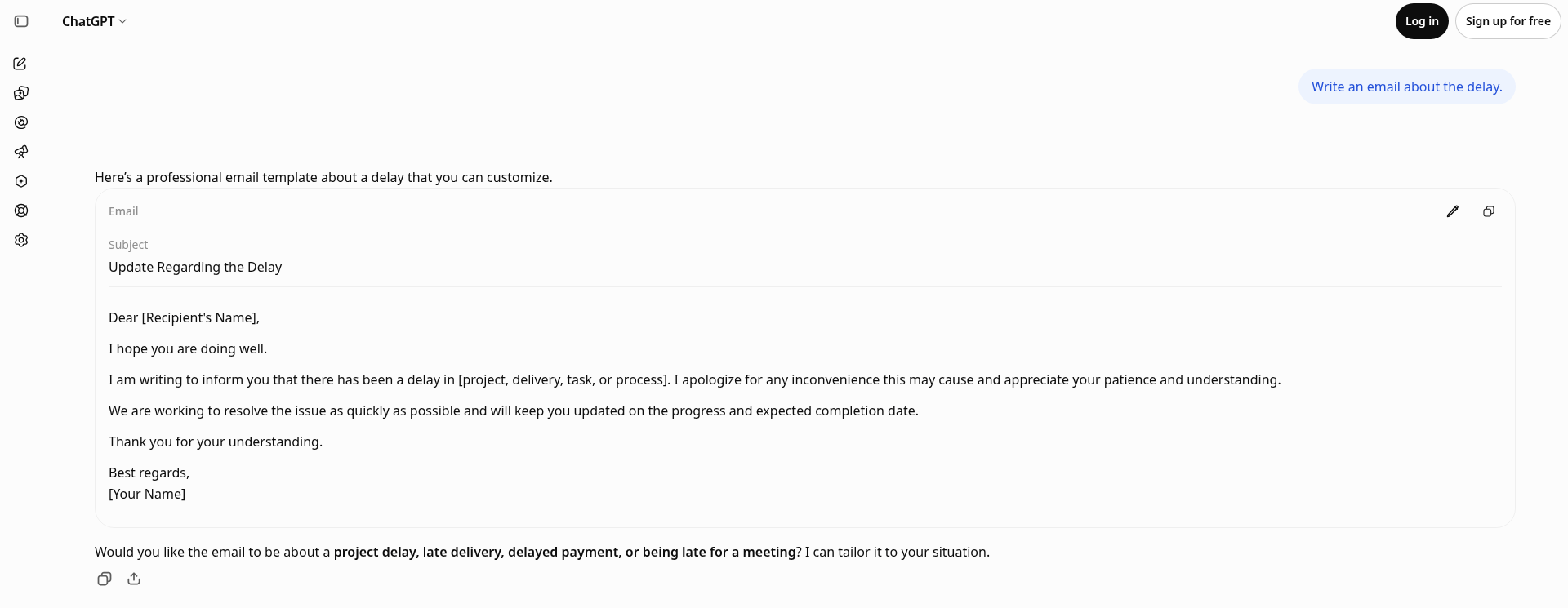
Real ChatGPT reply to the vague prompt: a fill-in-the-blanks template that ends by asking what kind of delay.
After:
I'm a QA lead. Write a short email to Sarah, product owner at our
client. Our app release moves from March 3 to March 10 because we
found a payment bug. Sarah is direct and dislikes corporate language.
Under 120 words. Offer a 15-minute call.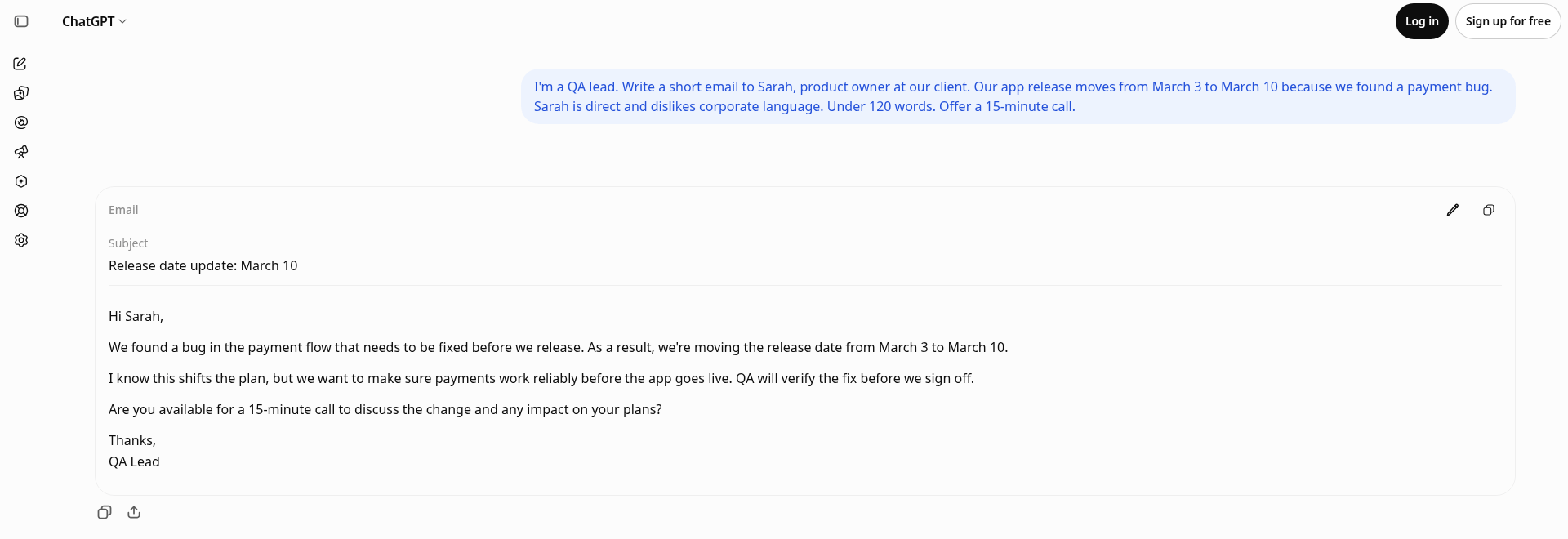
The briefed prompt: a short “Hi Sarah” email with the new date, the reason and a call offer.
What changes: An email you can actually send.
Pain point 2: “Way too long, or the wrong shape”
Why it happens: If you don’t specify length and format, the AI guesses. It often guesses “more”.
The fix: Order it like food: size, shape, what goes on it.
Before:
Summarize these meeting notes.After:
Summarize the notes below for my manager, who missed the meeting.
- 3 bullets: key decisions
- Table of action items: Task | Owner | Due date
- One line on risks
Under 150 words.
What changes: A summary your manager reads in 30 seconds.
Pain point 3: “It doesn’t sound like me” (and “make it better” makes it worse)
Why it happens: “Casual” and “better” mean different things to different people, so the AI uses its own defaults. Hello, “In today’s fast-paced world…”
The fix: Show, don’t tell. Paste an example you like (this is “few-shot prompting”: teaching by example), and spell out what “better” means. Anthropic’s guide calls examples “one of the most reliable ways to steer Claude’s output format, tone, and structure.”
Before:
Make this customer reply better.After:
Rewrite my reply below to match the tone of this one, which
customers loved: "Ugh, that's annoying, sorry! We found the cause
and a fix ships Thursday. I'll ping you when it's live."
Better means: shorter, owns the problem, gives a next step.
Keep all dates and facts exactly as written.
What changes: It sounds like your team, and nothing important gets rewritten.
Pain point 4: “It made things up, confidently”
Why it happens: AI produces text that sounds right. When it doesn’t know, it can fill the gap with plausible fiction (“hallucination”). Even heavy users are wary: in the 2025 Stack Overflow Developer Survey, “more developers actively distrust the accuracy of AI tools (46%) than trust it (33%).”
The fix: Give it the source material, limit it to that, and let it say “I don’t know”.
Before:
Summarize our Q3 test results with key stats.After:
Using ONLY the report below, summarize our Q3 test results.
Every number must come from the report; name the section.
If something isn't in the report, write "Not in report".
No outside facts or benchmarks.
What changes: Answers you can trace and check. (Still check anything important.)
Pain point 5: “It agrees with everything I say”
Why it happens: Assistants are trained on human feedback, and humans like being agreed with. A 2023 Anthropic study found “five AI assistants consistently exhibit sycophancy across four varied free-form text-generation tasks.” (Sycophancy means telling you what you want to hear.) In the same study, the assistants gave more positive feedback on text when the user said they liked it or wrote it.
The fix: Ask for critique explicitly. And don’t reveal which answer you’re hoping for.
Before:
Here's my test strategy. What do you think?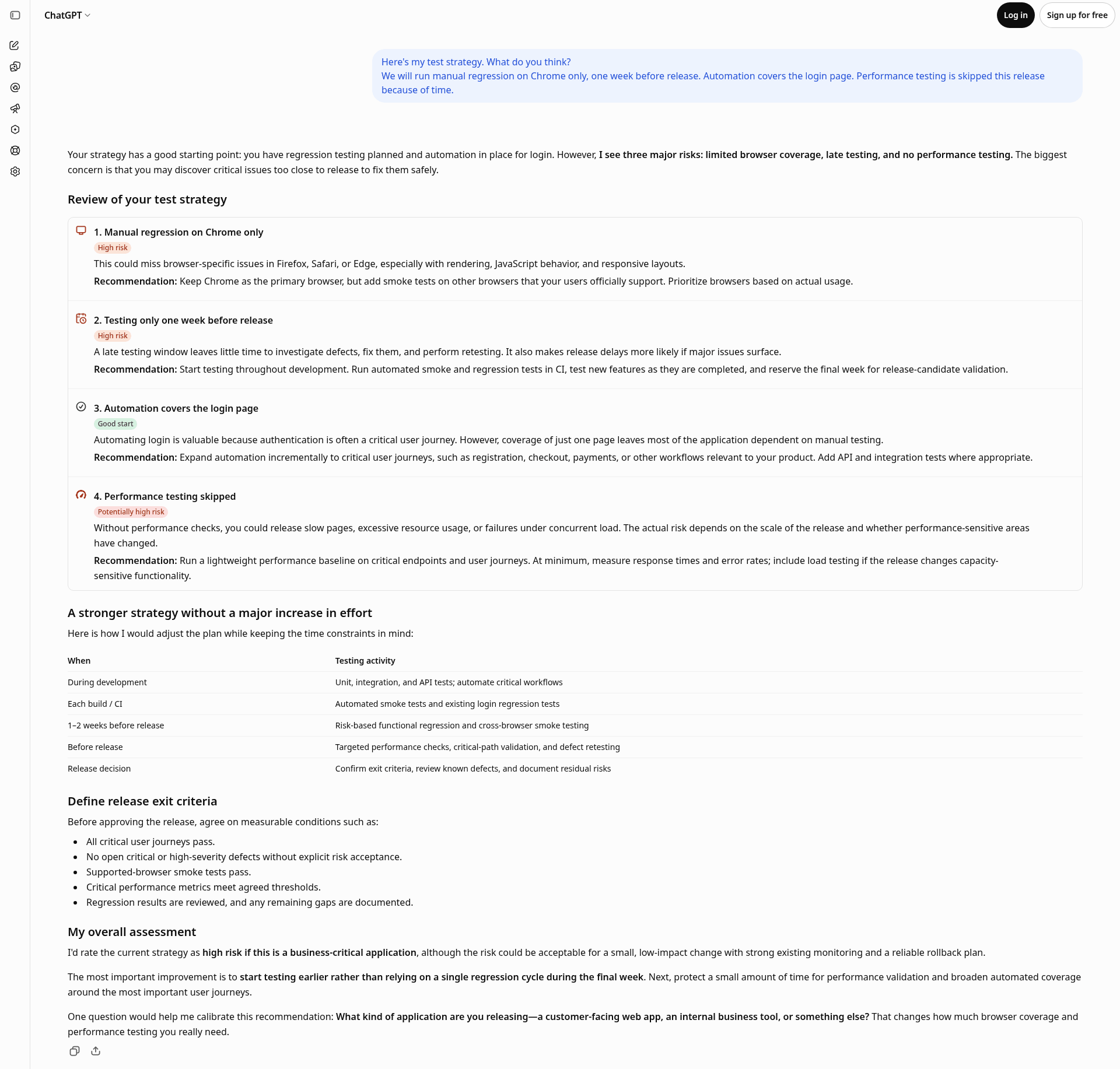
With a short sample test strategy pasted under the prompt: “a good starting point”, a friendly review, and a closing question about your app.
After:
Review this test strategy as a skeptical senior QA engineer.
List the 5 biggest risks or gaps, most serious first, and what
could go wrong in production. No compliments; I want problems.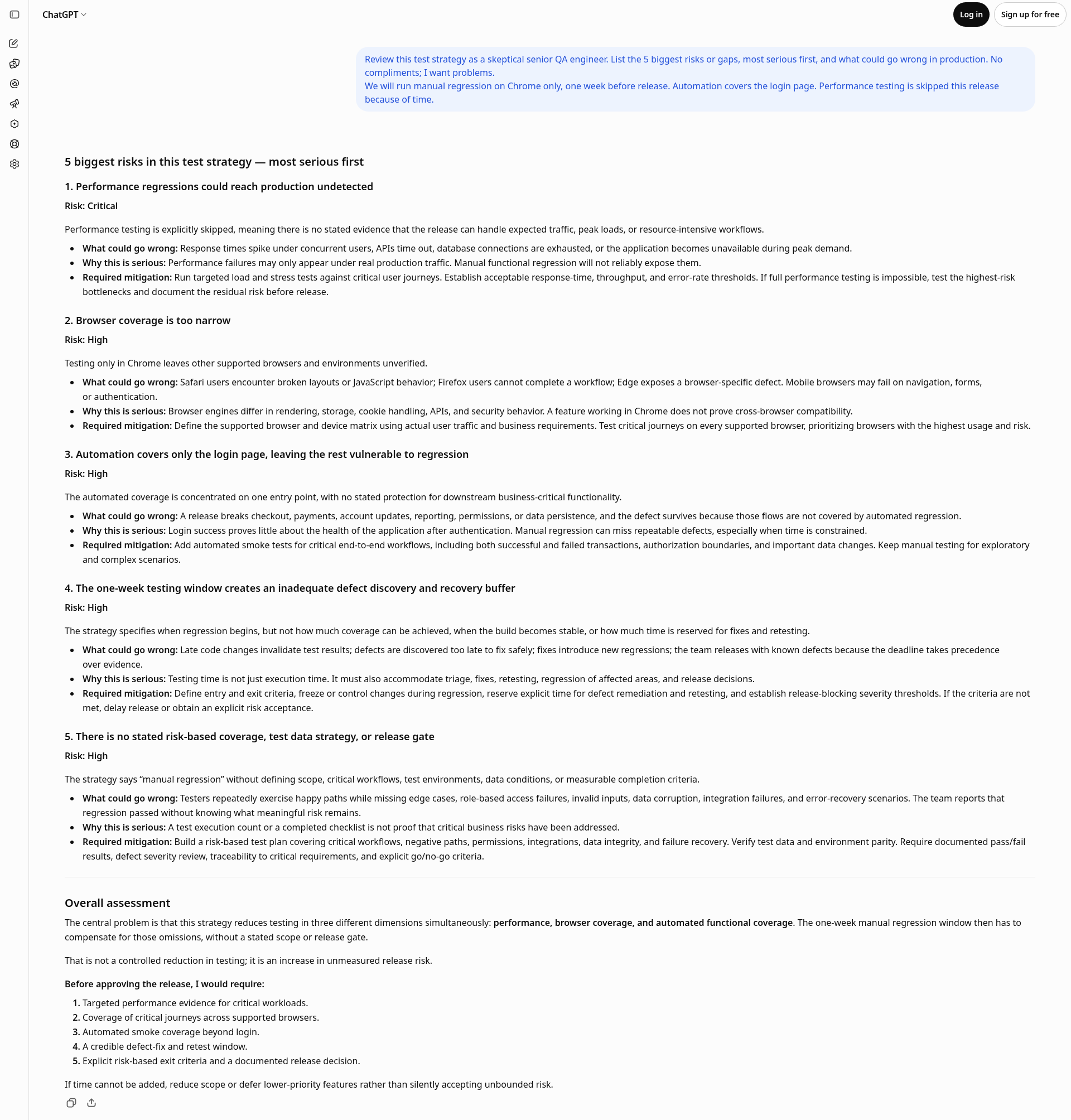
Same sample strategy pasted under the skeptical prompt: five ranked risks, skipped performance testing first (Critical), no compliments.
What changes: A sparring partner instead of a cheerleader.
Pain point 6: “We were doing great, then it forgot everything”
Why it happens: Forty messages into trip planning, it suggests a steakhouse, though you said on message three that your partner is vegetarian. Long inputs get crowded. Stanford-led researchers found in “Lost in the Middle” (2023) that model “performance is often highest when relevant information occurs at the beginning or end of the input context, and significantly degrades” when it sits in the middle.
The fix: Restate key constraints when they matter. When a chat gets long, ask for a summary and start fresh with it.
Before:
Ok now plan dinner for day 4.After:
Plan dinner for day 4. Reminder: 2 adults, 2 kids, one adult is
vegetarian, about $80, no car. Then summarize every decision so
far so I can start a fresh chat.
What changes: Back on track, with a clean save point.
Pain point 7: “The coding agent fixed one bug and broke three things”
Why it happens: Coding agents (AI tools that edit your code) are eager. Without limits, “fix this” becomes “improve everything I can see”. It’s a familiar pain: the top frustration in the Stack Overflow survey, cited by 66% of developers, is “AI solutions that are almost right, but not quite.”
The fix: Context, limits, a definition of done, and “look before you touch”. Break big jobs into steps.
Before:
Fix the login bug.After:
Users get logged out after 5 minutes instead of 30.
Step 1: Read the session code and explain the likely cause.
Don't edit yet.
Step 2 (after I approve): smallest possible fix. Only touch
session-timeout files. Don't refactor or delete tests.
Done = all tests pass, plus one new test for the 30-minute session.
What changes: A small, reviewable change instead of a mystery.
The reusable template: R-G-C-T-F-C-Q
Quick questions need one line. For anything that matters, run through:
- Role: Who should the AI act as?
- Goal: What are you trying to achieve, and why?
- Context: Audience, background, source material.
- Task: The exact job.
- Format: Length, structure, tone.
- Constraints: What to avoid or keep.
- Quality check: What to verify before answering.
Filled-in example:
Role: Senior QA engineer.
Goal: Test cases for "forgot password" so we can test tomorrow.
Context: Reset link valid 15 minutes; password min 10 chars, 1 number.
Task: Cover happy path, edge cases and security.
Format: Table: ID | Steps | Expected result | Priority. 12-15 cases.
Constraints: Don't assume unlisted features; mark assumptions.
Quality check: Cover expired and reused links. If anything is
unclear, ask me up to 3 questions first.
That last line, “ask me questions first”, improves almost any prompt.
Bonus trick: let the AI write the prompt with you
I need [a test plan / proposal / video script]. Before writing,
interview me one question at a time until you have what you need.
Or paste your draft prompt and ask: “What’s missing or unclear? Show me an improved version.”
Your 30-second checklist before hitting Enter
- Context: Who am I, who’s it for, what’s the situation?
- Goal: Does it know why, not just what?
- Format: Length, structure, tone?
- Example: If style matters, did I show one?
- Boundaries: What must not change or be invented?
- Sources: For facts, did I paste material and allow “I don’t know”?
- Size: One clear task, or should I split it?
- Honesty: Do I want praise, or critique?
One small change, starting today
Prompting isn’t magic. It’s briefing a smart colleague: clear goal, right context, a picture of what good looks like.
Pick one fix and use it in your next prompt today. Then tell me how it went.
What’s your biggest frustration when talking to AI? Share it in the comments. I’d love to collect them for a follow-up post.
Sources
- Anthropic. “Prompting best practices: Be clear and direct / Use examples effectively.” Claude Docs, accessed October 2026. https://docs.anthropic.com/en/docs/build-with-claude/prompt-engineering/be-clear-and-direct
- Stack Overflow. “AI.” 2025 Stack Overflow Developer Survey, 2025. https://survey.stackoverflow.co/2025/ai
- Sharma, M., Tong, M., et al. (Anthropic). “Towards Understanding Sycophancy in Language Models.” arXiv:2310.13548, 2023. https://arxiv.org/abs/2310.13548
- Liu, N. F., Lin, K., Hewitt, J., et al. (Stanford University, UC Berkeley, Samaya AI). “Lost in the Middle: How Language Models Use Long Contexts.” arXiv:2307.03172, 2023 (published in TACL). https://arxiv.org/abs/2307.03172